
Using our gift card
How to use your Zenith TV gift card
Did you recently receive a Zenith TV gift card 🎉? This card allows you to enjoy our subscriptions and access your favorite channels and content. Here's how to use it:
Steps to use your gift card
1️⃣ Go to our website (https://zenithtv.net)
- Log in to your Zenith TV account on our official website.
- If you don't yet have an account, you can easily register by following the instructions on the registration page (https://zenithtv.net/mon-compte/).
- IMPORTANT Please register using the e-mail address on which you received the gift card. Otherwise, the gift card cannot be used.
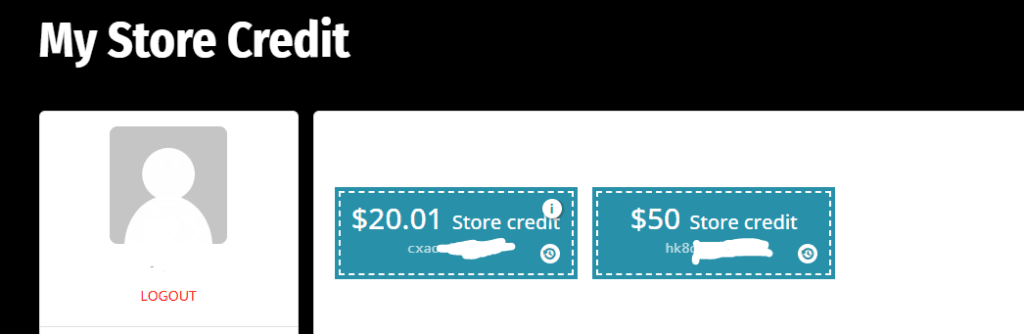
- 2️⃣ Have a look at the «My gift cards» section in your account
- You should now notice the gift card amount appear.
- Clicking on it at this point doesn't work, as you don't have any products added to the basket yet.
- 3️⃣ First method: Add a product to the shopping cart
- Add a subscription to the basket, choosing the duration and other options that apply.
- Once you've done that, you can go to your account, into «My gift cards» and click on the one you want to apply. Then go back to the basket and you'll see the discount applied. If nothing happens, refresh the page.
- 4️⃣ Second method: Copy the gift card code from the «My gift cards» page on your account
- Add a subscription to the basket, choosing the duration and other options that apply.
- Once this is done, you can paste the coupon code into the «promo code» box and the discount will be applied.
Gift card operation and use cases
The Zenith TV gift card works simply and flexibly. When you use your gift card to purchase a product, the card amount is applied directly to the total price of your order.
- Example 1: If you choose a subscription costing 79.99 $ and you have a gift card worth 50 $, the remaining amount to pay will be 29.99 $.
- Example 2: If the product costs exactly 50 $ and you use a 50 $ gift card, your order will be completely free and your card balance will be 0 $.
- Example 3: If the product costs 29.99 $ and you use a 50 $ gift card, there will be a balance of 20 $ on your gift card. This amount can be used for a future order by following the same steps.
The Zenith TV gift card never expires, so you can use it at your own pace, without worrying about a deadline. The remaining balance on your card can be used for future orders until it's used up.
How do I send a gift card?
1️⃣ Choose an amount
- Select a predefined option or enter a customized amount.
2️⃣ Enter recipient information
- Recipient Email The email address of the recipient who will receive the gift card.
- Sender Name Your name, which will appear as the sender.
3️⃣ Add a personalized message
- Include a note to accompany your gift.
4️⃣ Plan your shipment
- Send the card immediately or schedule it for a later date.
Buy your gift card now!
Click here to go to the gift card purchase page.
Need help?
If you have any questions or problems using your gift card, please do not hesitate to contact our support team. We're here to help!
 French
 English


